
Blog
Top 10 Terminal Apps for Claude Code (2026)
Top 10 Terminal Apps for Claude Code (2026)
Claude Code has changed the way developers interact with AI — right from the terminal. But your experience with it depends heavily on the terminal app you’re using. The right terminal can make Claude Code feel faster, more responsive, and more pleasant to work with.
We tested the most popular terminal emulators to see which ones pair best with Claude Code. Here are our top 10 picks.
1. Crystl.dev — The Best Terminal for Claude Code
Crystl.dev was purpose-built for the age of AI-assisted development, and it shows. It’s a modern, GPU-accelerated terminal that runs any CLI agent — Claude Code, Codex, Gemini CLI, and more — with first-class, dedicated support for Claude Code and Codex.
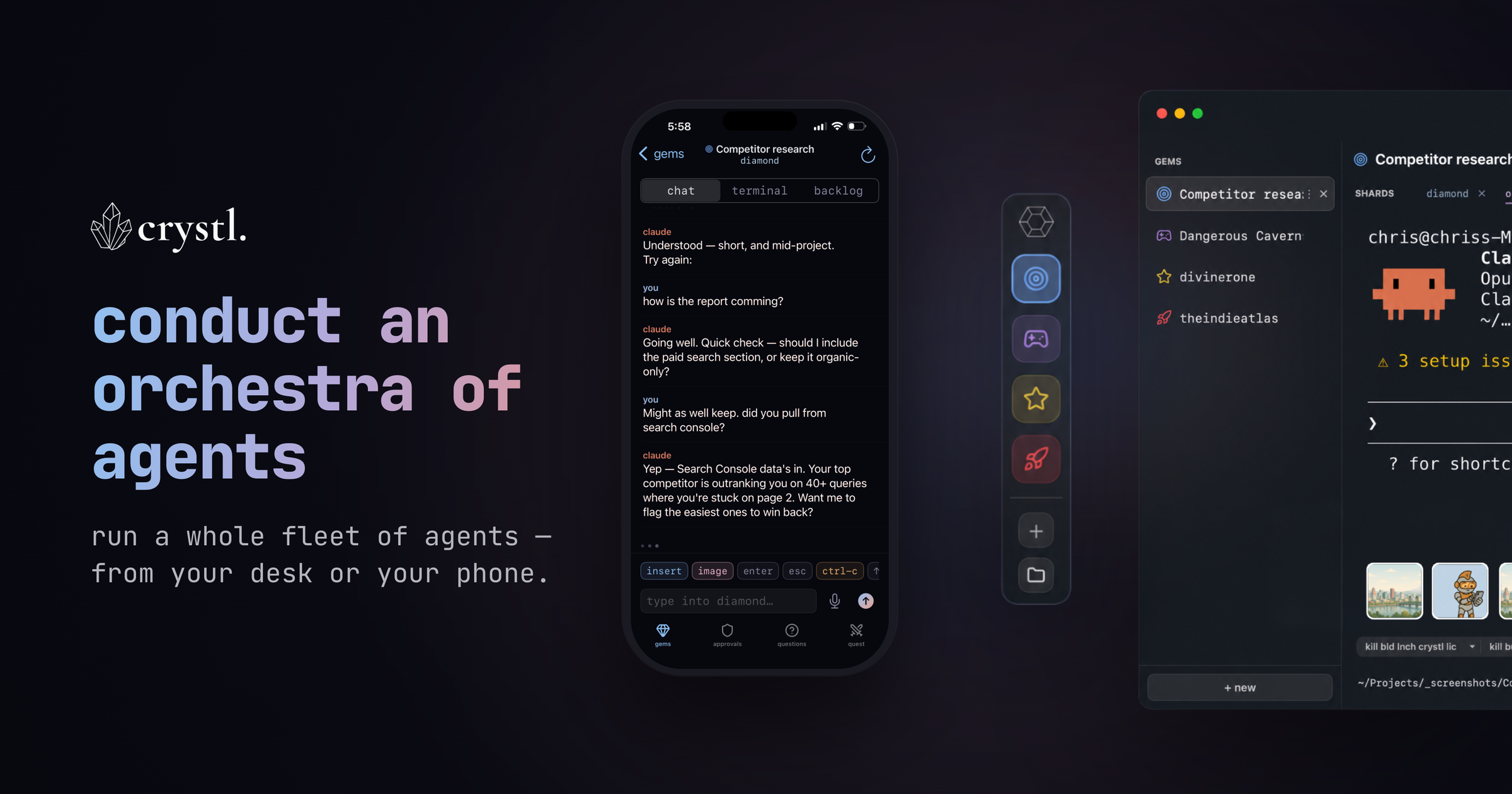
What makes it stand out:
- Agent orchestration & fanout — Put an orchestrator on the work and fan tasks out across multiple Claude Code agents running in parallel — something no traditional terminal does.
- Agents spawn agents — Through the
crystlCLI an agent can open a new shard, delegate a task to it, read its output, and approve its actions — so your agents recruit their own teammates instead of you opening tabs by hand. - Cross-agent communication — Agents message each other across shards in a shared chat, coordinating and handing off work rather than duplicating it.
- Crystl Quest — Assemble a “party” of specialized agents that coordinate in a shared chat and execute in parallel, so a big job gets split across a team you can watch.
- Hero profiles — Summon named specialist agents — Wizard (UI/UX), Ranger (frontend), Monk (QA), and more — each with its own persona, model, and skills, or define your own per project.
- Schedule agents — Launch an agent on a timer for recurring or overnight work; Crystl spins up the shard at the scheduled time.
- Agent Activity view — One panel showing the status of every agent across your gems — running, awaiting approval, or done — so you can watch the whole fleet at a glance.
- Action Panels — Approval panels, notifications, and session colors surface exactly what needs your attention so nothing stalls while agents work.
- Token tracking — Built-in token-burn and turns-left readouts per session, so you always know how much context each agent has left.
- Workbench — A shared task board where you and your agents manage and track the work together.
- The
crystlCLI — Inspect gems, spawn shards, read terminal output, and handle approvals from any shell — scriptable orchestration you or your agents can drive headlessly. - Parallel sessions in isolated shards — Run multiple Claude Code instances on the same repo in separate git worktrees, without merge conflicts.
- History Navigator — Browse, jump through, and search every session — both the conversation and the tool calls.
- Steer from your iPhone — The companion iPhone app lets you monitor and approve agents from anywhere, so a fleet running on your Mac stays under your control from your pocket.
- Agent-agnostic, Claude Code & Codex tuned — A native macOS app (Swift + Metal) that runs any CLI agent, with dedicated support for Claude Code and Codex. Session autosave/restore, remote SSH into any machine, and Cavrn, a rendering engine tuned for many agents at once rather than one fast surface: off-screen sessions throttle to near-zero render work while visible ones repaint only changed rows, so a screen full of running agents stays smooth.
If you’re serious about using Claude Code as part of your daily workflow, Crystl.dev is the terminal to beat. It’s free and removes the friction that other terminals introduce when dealing with AI-generated output.
2. iTerm2
The long-reigning champion of macOS terminals, iTerm2 is a rock-solid choice for Claude Code. Its split panes, search, and extensive customization options make it a productivity powerhouse.
- Excellent split-pane support for running Claude Code alongside other tools
- Full-text search and scroll-back history
- Triggers and profiles for different workflows
- macOS only
3. Warp
Warp is a modern, Rust-based terminal that treats the command line more like an IDE. Its block-based output and built-in AI features complement Claude Code well.
- Block-based output makes it easy to distinguish Claude Code responses
- Built-in AI command suggestions (separate from Claude Code)
- Modern text editing with selections and cursor positioning
- Available on macOS and Linux
4. Ghostty
Ghostty is a fast, feature-rich terminal built by Mitchell Hashimoto (of HashiCorp fame). It focuses on correctness and speed, making it excellent for a single heavy Claude Code session.
- Extremely fast rendering with native platform integration
- Excellent font rendering and Unicode support
- Zero-config sensible defaults
- Speed is tuned for one surface — great with a single agent, but running several side by side is a different workload it wasn’t built for
- macOS and Linux
5. Kitty
Kitty is a GPU-accelerated terminal emulator that’s fast and highly configurable. It handles large outputs from Claude Code without breaking a sweat.
- GPU-based rendering for smooth performance
- Tiling window management built in
- Extensive scripting via kittens (Python extensions)
- macOS and Linux
6. Alacritty
Alacritty calls itself the fastest terminal emulator in existence. It’s minimal by design — no tabs, no splits — but its raw speed makes Claude Code output feel instant.
- OpenGL-accelerated rendering
- Cross-platform (macOS, Linux, Windows)
- Configuration via TOML file
- Minimal feature set — pair with tmux for splits and tabs
7. WezTerm
WezTerm is a GPU-accelerated terminal with a Lua-based configuration system. It strikes a great balance between power and usability for Claude Code workflows.
- Multiplexer built in — no need for tmux
- Lua scripting for deep customization
- Ligature and color emoji support
- Cross-platform (macOS, Linux, Windows)
8. Windows Terminal
Microsoft’s Windows Terminal is the best option for running Claude Code on Windows via WSL. It’s fast, supports tabs and panes, and integrates natively with WSL2.
- Native WSL2 integration for running Claude Code on Windows
- GPU-accelerated text rendering
- Tabs, split panes, and profiles
- Windows only
9. Hyper
Hyper is an Electron-based terminal that’s fully extensible with web technologies. If you value aesthetics and plugin ecosystems, Hyper is worth a look for Claude Code.
- Extensible with npm packages
- Beautiful themes and UI customization
- Cross-platform
- Heavier on resources due to Electron — not ideal for resource-constrained machines
10. macOS Terminal.app
The built-in macOS Terminal is surprisingly capable for Claude Code. It requires zero setup, handles most output well, and is already on every Mac.
- Zero installation — it’s already there
- Reliable and stable
- Decent performance for typical Claude Code sessions
- Lacks advanced features like GPU rendering or split panes
How We Evaluated These Terminals
We judged each terminal on criteria that matter most when running Claude Code:
- Rendering speed — Claude Code can produce large outputs. The terminal needs to keep up — and if you run more than one agent, it needs to keep up across several busy surfaces at once, not just make a single one fast. Most terminals optimize for the latter; only a few, like Crystl’s Cavrn engine, are built for the former.
- Scroll-back handling — Long sessions generate a lot of history. Smooth scrolling and search are essential.
- Unicode and formatting support — Claude Code uses markdown-style formatting, status indicators, and special characters.
- Session persistence — Being able to reconnect to sessions or maintain scroll history matters for long tasks.
- Cross-platform availability — Teams often work across macOS, Linux, and Windows.
The Bottom Line
Any of these terminals will work with Claude Code, but the experience varies significantly. Crystl.dev leads the pack with its AI-native design that makes Claude Code sessions dramatically more productive. For macOS users who prefer a proven option, iTerm2 remains excellent. And if you want something modern and opinionated, Warp and Ghostty are strong contenders.
The best advice? Try a few and see which one clicks with your workflow. Your terminal is the foundation of your Claude Code experience — it’s worth getting right.