
AI Tools · Growth
AI Agent Orchestration for Agencies: Working on Three Clients at Once
On November 12, 2026, Crystl announced Deus, a super-orchestrator that manages AI orchestrators across every project at once. I build Crystl, so read this with that in mind. The release was written for a general audience. This post is the agency version.
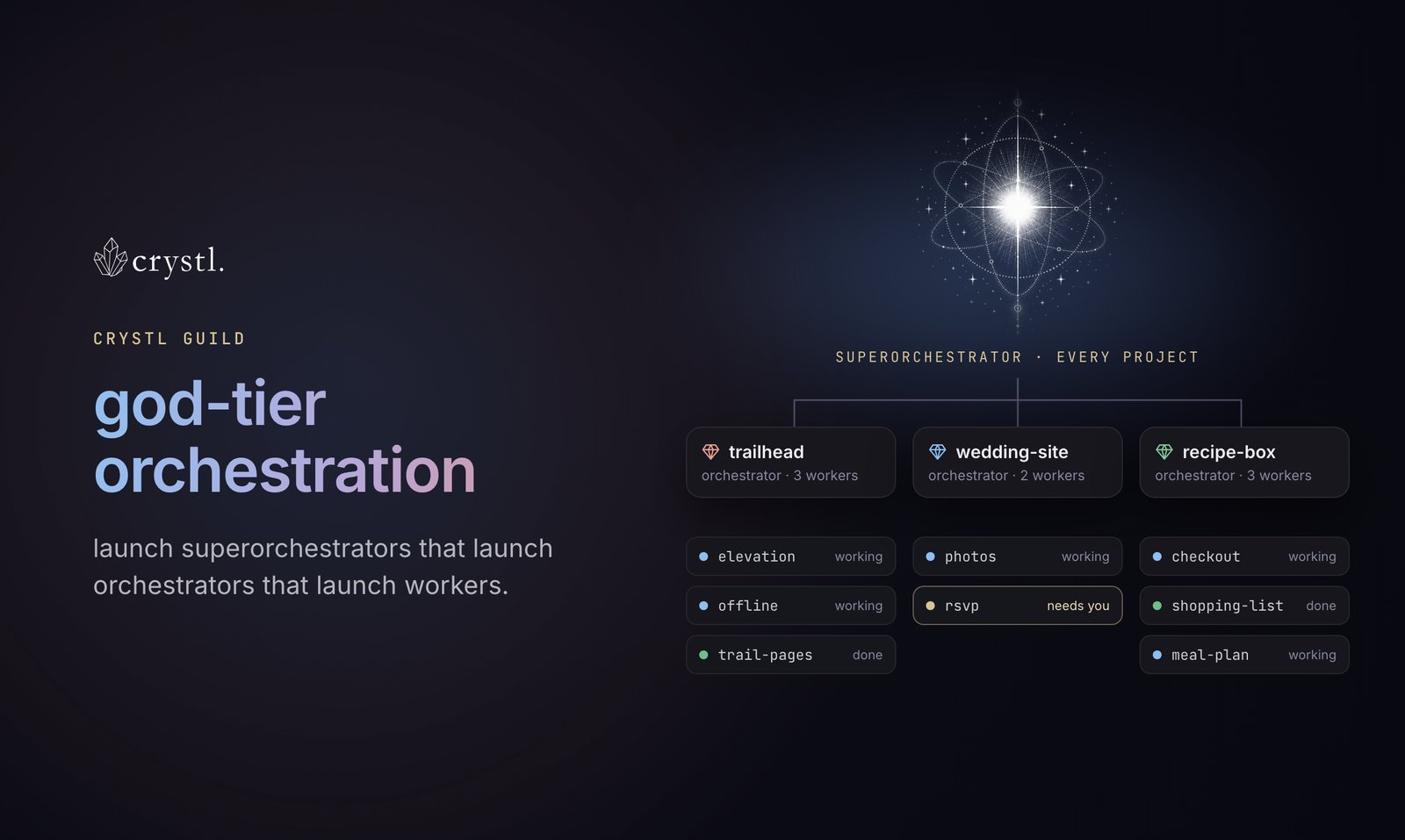
The short version: if each client is a folder, AI agent orchestration lets an agency work on three clients at the same time. An orchestrator agent runs the work inside each client folder. Deus watches all of the client folders and gives you one list of what is finished, what is broken and what needs you.
What AI agent orchestration means
AI agent orchestration is one agent handing out work to other agents and checking their results. Crystl uses three levels:
| Level | What it does | Scope |
|---|---|---|
| Worker agent | Does one task, such as writing a page or checking a site | One task |
| Orchestrator | Splits a job into tasks, hands them to workers and checks the results | One project |
| Deus (super-orchestrator) | Checks every orchestrator and sorts what it finds into working, finished, blocked on a person, or broken | Every project |
Deus does not do the work itself. According to the release, “it asks before it merges, publishes, or deletes anything.” Anything that can’t be undone waits for a person.
Why a folder per client makes orchestration work
Orchestration works for an agency because each client already has its own folder. I explained the folder idea on the Haus Advisors podcast: an AI assistant is a folder of client files with an agent run over it. The folder holds the client’s notes, tasks, contacts and email.
In Crystl, each folder opens as its own project. An orchestrator started in a client’s folder reads that client’s files, and so do its workers. Client A’s agents work from client A’s notes, and client B’s agents work from client B’s.
That separation is what makes parallel work practical. Three orchestrators can run in three client folders at once, and each one works from its own client’s files.
What working on three clients at once looks like
Say you have three clients with work due this week. In each client’s folder you start an orchestrator and give it the job:
- Client A, a site audit. The orchestrator splits the audit into pages and hands each set to a worker.
- Client B, the monthly report. One worker pulls the search data and another drafts the summary.
- Client C, three blog drafts. The orchestrator gives each draft to its own worker and checks them against the client’s brand notes.
Without Deus, you would click between three projects to find out which one is stuck. With Deus, you get one list. Client A’s audit is finished. Client B’s report is waiting on a question about last month’s numbers. Client C’s second draft failed a check. You answer the question, look at the failed draft, and leave the rest alone.
The list matters more as the client count grows. The release says I have over 30 projects in Crystl. Many are marketing and web clients, and I can run agents on all of them at the same time. With that many, it gets hard to tell which agents are stuck, have questions or need approvals. That is the problem Deus was built for.
What agency people said about Crystl
Ajay Sutherland, a web designer and early user, is quoted in the release: “I used both Warp and Cursor, but neither really leaned into orchestration and multi-tasking like crystl.” He also said he values that “everything runs local on my machine and that the developers are committed to supporting open models.”
Gray Ayer wrote in a Product Hunt review: “Now with my agents talking to each other and having greater transparency concurrently, I’m getting novel feedback for approaches I hadn’t considered.”
Which AI agents Crystl runs
Crystl runs Claude Code, Codex, Antigravity CLI, Kimi Code and other command-line agents, including models you host yourself. You bring your own agent account. Agents from different vendors can work side by side, so one client folder can run Claude Code while another runs Codex.
Files, rules and memories stay on your own Mac. Your client folders stay yours, instead of living inside an AI vendor’s platform.
Where Crystl falls short for agencies
- macOS only. There is an iPhone app, but no Windows or Linux version.
- It is a terminal. Most agency people have never opened one. As I said in the release, “You don’t need to be a coder. It’s just like talking to ChatGPT in your browser, but you can do a lot more and you have more control.” That is still a real hurdle, though.
- Deus needs a paid plan. The free plan includes unlimited projects. Orchestration and Deus come with a Guild membership, at $18 a month or $170 a year.
- Approval cards depend on the agent. Approval cards work with Claude Code, Codex and Kimi Code. Other agents are watched at the terminal level, which shows less detail.
- It is new. Crystl is less than a year old. It has more than 1,200 sign-ups and finished #6 on Product Hunt on November 6, 2026.
- Three clients means three times the agent usage. Parallel work moves faster, but it uses up your agent plan’s limits faster too.
How to set up AI agent orchestration for your agency
- Make one folder per client, with that client’s notes, tasks, contacts and recent email.
- Open each client folder in Crystl as its own project.
- Start an orchestrator in each client’s project and give it that client’s job.
- Start Deus to watch every project, and work from its list of what needs you.
Start with two clients, not ten. Check how well the orchestrators split the work before you add more.