
AI Tools · Growth
Grow Your Agency's Chris Bolton Talks AI Agents and Agencies on Haus Advisors
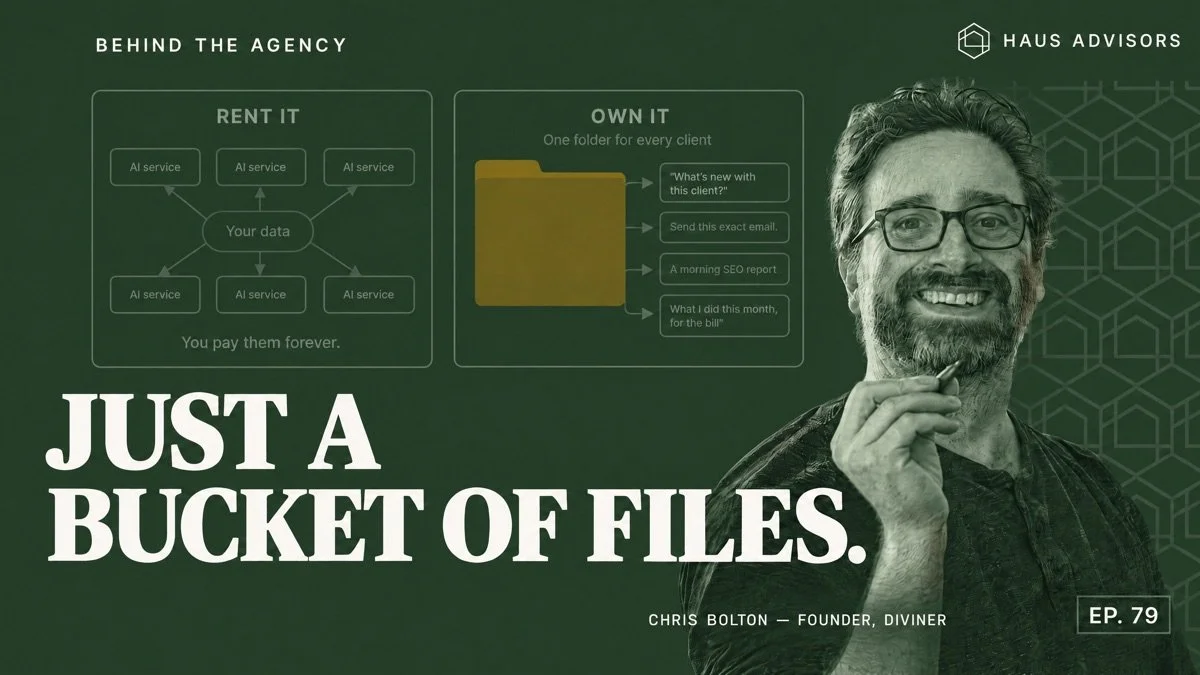
I was a guest on episode 79 of the Haus Advisors podcast, “Your AI Assistant Is Just a Bucket of Files.” David Hoos hosted it, and it came out on October 28, 2026. We talked about how I use AI agents to run Diviner, my agency, without hiring the assistant I had planned on.
The short version: an AI assistant for an agency is a folder of client files with an AI agent run over it. Keep that folder somewhere you own.
Watch the full episode on YouTube, or read David’s show notes on Haus Advisors.
Key points from the episode
- An AI assistant is your own files with an agent run over them. As I put it on the show: “It’s not like an artificial intelligence. It’s just a bucket of files that you run an AI agent over.”
- One folder per client. Each folder holds that client’s notes, task lists, contacts and email. An agent started in the folder already knows the client.
- AI companies want to hold those folders for you. If you let them, you pay them forever.
- Some agents run on a schedule. One sends me a morning SEO report for every client site. Another tracks the time I spend in each project, so billing is easy.
- I never hired the assistant. I planned to hire one once Diviner got busy. AI kept taking over that work first.
Why an AI assistant is just a bucket of files
Every message you send to an AI model starts a fresh copy of the model. The model reads what it is given, answers, and stops. On the show I said “it is born and it dies.”
So the only part you control is what the model reads. That is why I keep a folder for each client. When I start an agent in a client’s folder, the agent reads my notes, the open tasks, the contacts and the recent email before it answers. I can ask what is going on with that client this week. I can tell it to send an email with my exact words.
The model is the part you can swap out. The folder of client history is the asset. But it only stays an asset while it lives somewhere you control.
AI agents vs. marketing automation
An AI agent is different from marketing automation. A marketing automation tool, like a Zapier workflow, runs the same fixed steps every time a trigger fires. An AI agent reads the client folder and decides which steps to take. So one agent can answer a question about one client and then draft an email for another. The trade-off is that an agent can also pick the wrong step, which is why I review what it does before it acts (more on that below).
Why agencies should own their client data
Most AI vendors make the same offer: give us your data and we will handle it. Each tool takes one slice. One writes email, one takes notes, one tracks keywords, one summarizes calls. When I went solo, every new client added about five more logins, and every login wanted a code from my phone.
The first thing AI agents changed for me was logins. An agent can reach most tools through their APIs, so I stopped logging into each one. I also stopped copying and pasting. I have lost whole days at agencies moving content from one tool to another. Now I ask the agent to move it.
I answered the tool pile with a folder instead of another tool. “You don’t need to use like 10 different services. You just need one AI to look at your data and help you out when you need it.”
The risk of renting is the price. “You’ll pay them forever, and if they keep raising the price you just get screwed.” Owning your files has a cost too, though. You have to keep the folders organized yourself, and nobody has a perfect setup yet. That includes me.
Client reporting with scheduled AI agents
Some of my agents run on a schedule without me starting them. Most of them do client reporting.
| Agent | What it does |
|---|---|
| SEO weather report | Checks Search Console, analytics and keywords for every client site each morning, then emails me a summary: “This website is sunny. This website is rainy.” It also says why. |
| Project time tracker | Tracks how much time I spend in each client project, so I can answer “what have you even done for us lately?” |
| Bug and site checks | Checks my software for bugs and watches my sites’ health. |
Setting one of these up does not take much. I tell the agent what I want it to check and how often.
How I run and review my AI agents in Crystl
I run my agents in Crystl, a macOS app I build for running several AI agents side by side. Each client folder opens in Crystl as its own workspace, and I start Claude Code, Codex or GLM agents inside it. GLM is an open-source model family from Z.ai, and Crystl can point an agent at it the same way it runs the hosted ones. Every agent in that workspace reads the same client files, whichever model it runs on.
Before an agent sends an email or changes a client’s site, it asks for approval. Crystl shows the request as a card, so I can read what the agent wants to do before it does it. That approval step is how I keep the “send this exact email” kind of task safe.
Crystl has a free tier for running agents. The Guild plan, $18 a month, adds orchestration: splitting one job across several worker agents, and sequences that run work in stages. Crystl only runs on macOS, though, and the source is not public.
How to start using AI agents at your marketing agency
David ends the show notes with a test: where does your agency’s client history live right now? If the answer is six different tools, start there.
Pick one client and make one folder. Put the notes, tasks, contacts and recent email in it. Then start an AI agent in that folder, in Crystl or any terminal, and ask it what is going on with that client.
I also build Diviner One, the marketing suite I use with clients.